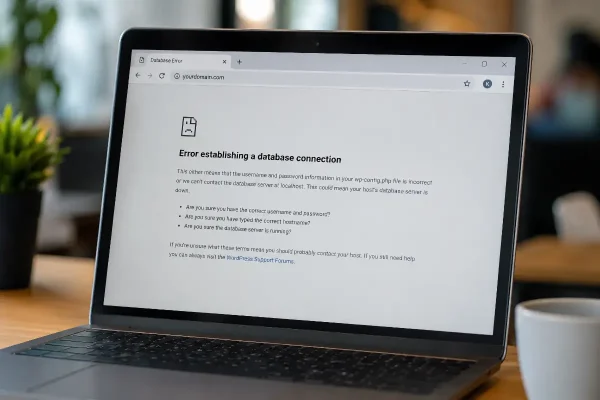
“Error establishing a database connection” is one of the more serious WordPress errors because it can take your whole website offline.
A visitor does not see your homepage, service pages, products, contact form, or booking page. They see a technical message. For most business owners, that is enough to create stress very quickly.
The good news is that this error can often be fixed by an experienced WordPress support team. The less good news is that it is not the kind of issue most people should try to solve by guessing.
What this Error Establishing a Database Connection means
WordPress needs to connect to a database to load your website.
Your pages, blog posts, website settings, menus, users, plugin settings, and other important information are stored in that database. When WordPress cannot connect to it, the site cannot load properly.
That is why the error message appears:
“Error establishing a database connection”
The website files may still be there. The domain may still be active. Your hosting may still be running. But WordPress cannot reach the database it depends on.
Why this can happen
There are several common causes.
- The database username or password may be incorrect.
- The database server may be unavailable.
- A database table may be corrupted.
- The hosting account may have reached a resource limit.
- The error may also appear after a website migration, server change, backup restore, or hosting update.
As a site owner, all of these causes look almost the same. Your site is down.
To a WordPress support team, each cause needs a different fix.
Why this is a technical repair
This issue usually needs access to hosting, server files, database settings, and WordPress configuration files.
That means the person fixing it may need to check items such as:
- WordPress database connection settings
- Hosting database access
- Server availability
- Database permissions
- Recent migration or restore activity
- Hosting resource limits
- Backup options
These are not things most business owners deal with every day. Changing the wrong setting can make recovery slower.
A small mistake can also create a bigger problem. For example, restoring the wrong backup can remove recent content. Editing the wrong configuration file can stop the site from loading at all. Deleting the wrong database can cause serious data loss.
This is why it is worth getting experienced help early.
What you can check before asking for support
There are a few safe checks you can make.
- Check whether your hosting account is active.
- Confirm your domain has not expired.
- Look for any emails from your hosting provider about outages, billing issues, malware, or server maintenance.
- Also think about what changed recently.
Was the website moved to new hosting? Was there a WordPress update? Did someone restore a backup? Was the database password changed? Did the hosting provider make server changes?
This information helps a support team find the cause more quickly.
When to stop trying to fix it yourself
Stop if you are being asked to edit server files, repair database tables, change database users, restore backups, or work inside phpMyAdmin.
Those tasks can be done safely by someone who knows what they are doing. You can also make the problem work if you don’t know what you’re doing.
The problem is often fixable. The risk comes from changing things without knowing which part has actually failed.
How Asporea Digital can help
Asporea Digital provides WordPress support for Hong Kong businesses that need their website back online quickly.
We can investigate the cause of the database connection error, check the WordPress and hosting configuration, identify whether the issue is related to the database, hosting, migration, or server resources, and take the right repair path.
Our role is to remove the guesswork.
You do not need to become a WordPress technician to get your website working again. You need a support team that understands WordPress, hosting, databases, and the pressure of having a business website offline.
Local WordPress support for Hong Kong businesses
Asporea Digital works with Hong Kong businesses that rely on WordPress for enquiries, bookings, online sales, service information, and day-to-day credibility.
When your site is down, the priority is simple: find the cause, fix the issue, and get the website running again.
Some database connection errors are straightforward. Others need deeper investigation. Either way, having a local support team available means you are not left trying to decode technical settings while your website is offline.
Need help with this WordPress error?
If your website is showing “Error establishing a database connection”, Asporea Digital can help you investigate and repair it.
Reach out to our English-speaking Hong Kong WordPress support team or call us on +852 9290-6881.